设为首页收藏本站

 找回密码
 注册

QQ登录

只需一步,快速开始

查看: 9622|回复: 5

Quick start your Raspberry Pi

[复制链接]
发表于 2012-4-19 14:24:23 | 显示全部楼层 |阅读模式
本帖最后由 Test 于 2012-4-19 15:09 编辑

Basic setup
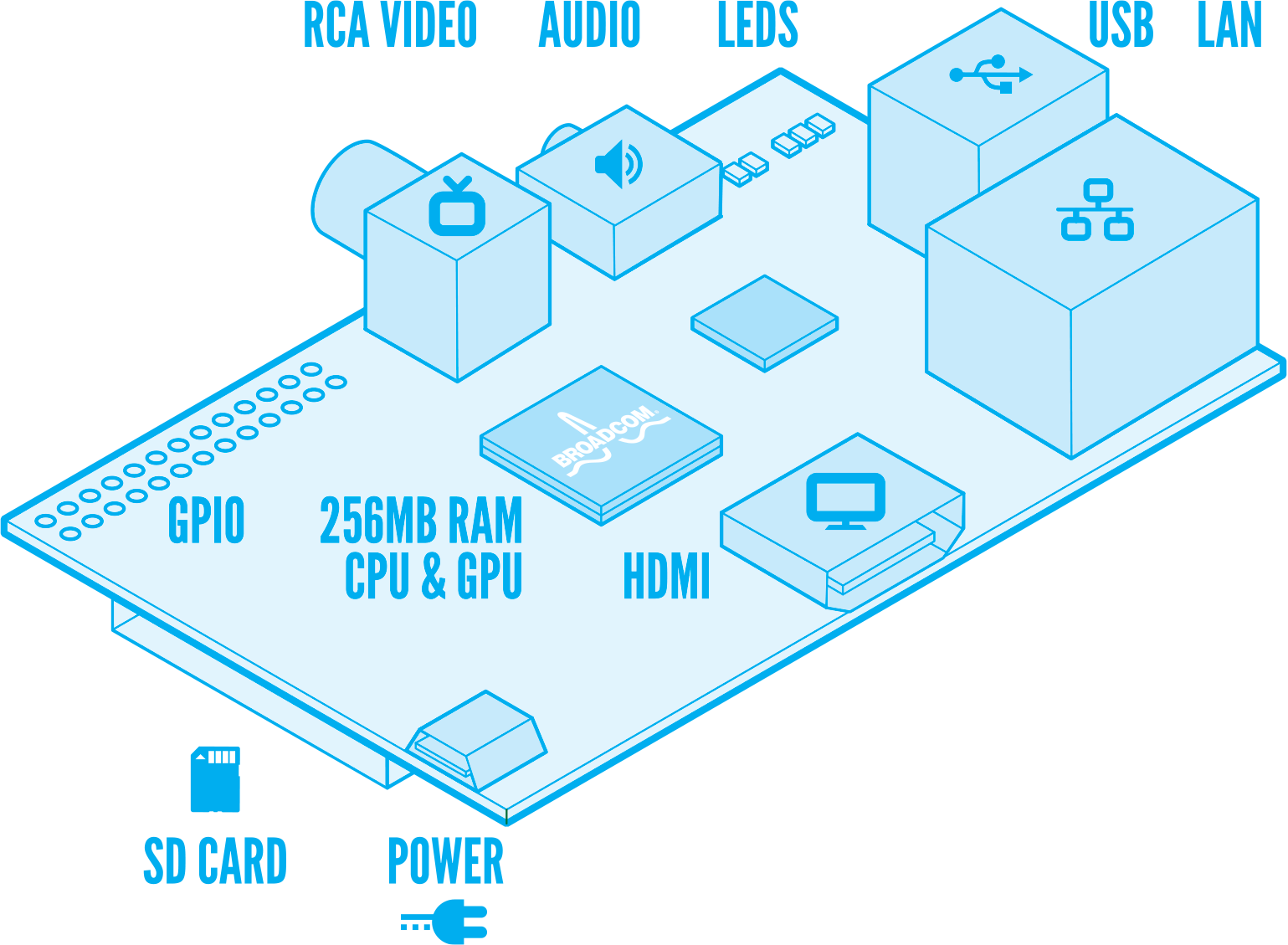
The setup described here is the simplest one, using just the USB ports on the board and a television or digital monitor. If you’re a total beginner, please visit the beginners’ section of our forums, where there are photos of what all the cables you’ll need look like, and more hints and tips to get you started - our community’s very friendly, and if you dive in, someone there will be happy to help you with any questions or problems you might have.
You will need:
  • USB keyboard and mouse.
  • Prepared SD card (see below).
  • HDMI or composite television, OR a monitor with DVI or HDMI input, and an HDMI/composite cable.
  • Micro USB power supply – make sure you use a good quality one, capable of providing at least 700mA at 5V. Do not attempt to power your Raspberry Pi by plugging it into a computer or a hub.
  • Ethernet LAN cable (optional).
Diagram by Paul Beech

You will need an SD card with an operating system preloaded before you can boot the Raspberry Pi. A brand-name (not generic) Class 4 card of 4GB or more is recommended. To obtain an SD card image, and for instructions on how to flash an SD card from a Linux or Windows PC, please refer to http://www.raspberrypi.org/downloads. We recommend that developers use the Debian “squeeze” image, which includes Python, gcc, and a range of example applications.
Digital audio is available via the HDMI connector. Analogue stereo audiois available from the 3.5mm jack. To boot the Raspberry Pi, connect the monitor, mouse and keyboard, insert the preloaded SD card and plug in the power. If you have inserted the Ethernet cable, the device will attempt to acquire a DHCP lease at startup. You can login with the username and password on the downloads page. For superuser privileges, “sudo” does not require a password. Once you are logged in, you can start the X window system using the “startx” command.
Kernel sources and a cross-compiling toolchain for use on an x86 Linux PC are available at https://github.com/raspberrypi.
Example code for OpenGL ES, OpenMAX and other multimedia APIs is available in the directory /opt/vc/src/hello_pi.
Forthcoming updatesNew SD card images are released regularly at http://www.raspberrypi.org/downloads. Major areas of on-going optimisation include offloading the X window system to the GPU, which will speed it up considerably. None of the browsers for Debian “squeeze” support HTML5, and there is currently no Flash support, so unfortunately you cannot watch YouTube videos; we’re investigating HTML5 solutions. There is currently no Java Virtual Machine (JVM) included in the default file system; we will address this in a future release.

http://www.raspberrypi.org/quick-start-guide

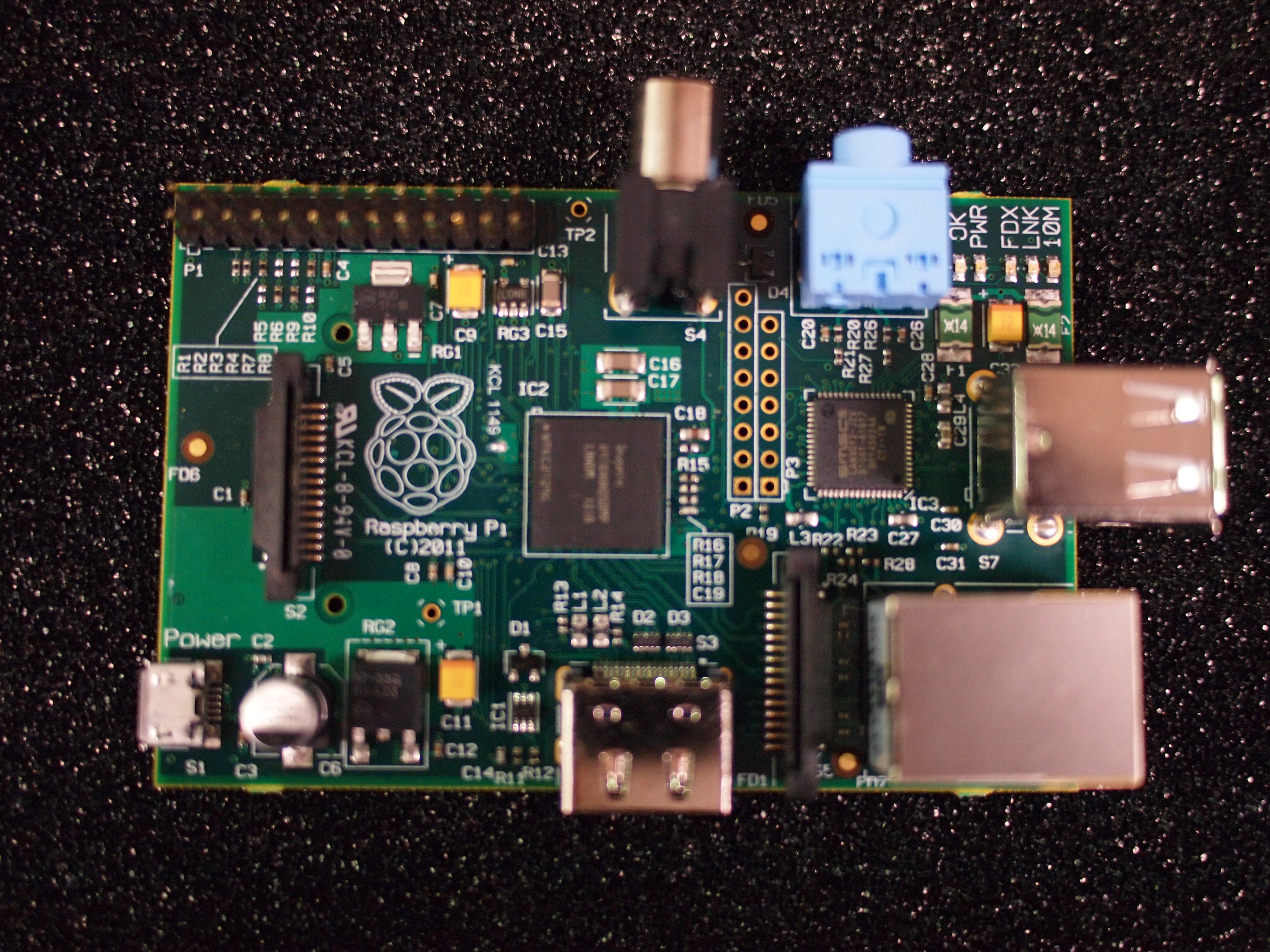
Raspberry Pi model B

The Raspberry Pi is a credit-card sized computer that plugs into your TV and a keyboard. It’s a capable little PC which can be used for many of the things that your desktop PC does, like spreadsheets, word-processing and games. It also plays high-definition video. We want to see it being used by kids all over the world to learn programming.

What’s the difference between Model A and Model B?Model A has 128Mb of RAM Model A has been redesigned to have 256Mb RAM, one USB port and no Ethernet (network connection). Model B has 256Mb RAM, 2 USB port and an Ethernet port.
What are the dimensions of the Raspberry Pi?The Raspberry Pi measures 85.60mm x 53.98mm x 17mm, with a little overlap for the SD card and connectors which project over the edges. It weighs 45g.
What SoC are you using?The SoC is a Broadcom BCM2835. This contains an ARM1176JZFS, with floating point, running at 700Mhz, and a Videocore 4 GPU. The GPU is capable of BluRay quality playback, using H.264 at 40MBits/s. It has a fast 3D core accessed using the supplied OpenGL ES2.0 and OpenVG libraries.
Why did you select the ARM11?Cost and performance.
How powerful is it?The GPU provides Open GL ES 2.0, hardware-accelerated OpenVG, and 1080p30 H.264 high-profile decode.
The GPU is capable of 1Gpixel/s, 1.5Gtexel/s or 24 GFLOPs of general purpose compute and features a bunch of texture filtering and DMA infrastructure.
That is, graphics capabilities are roughly equivalent to Xbox 1 level of performance. Overall real world performance is something like a 300MHz Pentium 2, only with much, much swankier graphics.


 楼主| 发表于 2012-4-19 14:25:57 | 显示全部楼层

Yes, the Raspberry Pi Can Run Quake III Arena Impressively Well

                                                                                                                               
                                        Sam Gibbs - I have to say, while I was excited about the prospect of a tiny computer for around £20 when it was just in the pipeline, now we’re seeing what it can really do, I desperately want one for myself. The Raspberry Pi can play Quake 3, and I don’t mean just run it, I mean actually play it; faster than my full-blown PC did back when it was first released in fact.
I know there are Quake 3 ports out there that run great on Android phones, and id’s classic death match first-person shooter is over 12 years old, but to see the Pi handle it in its stride is still impressive. Time to start tooling-up for a bit of Quake 3 again; those finely honed railgun skills must have dulled a bit over the years. [YouTube via Raspberry Pi]
Thanks Darrell!


 楼主| 发表于 2012-4-19 14:31:03 | 显示全部楼层

The Raspberry Pi Promises to Be the Ultimate Retro Gaming System

The Raspberry Pi Promises to Be the Ultimate Retro Gaming System as This ZX Spectrum Emulator Port Shows
Sam Gibbs - There areloads of things you can do with your Raspberry Pi, once you’ve actually got it in your hands that is. You could turn it into a media centre; use it as a mini web server; build a NAS for streaming media with it, or even pack it full of emulators for the ultimate all-in-one retro-gaming machine. Now that’s what I’m talking about.
Andy Taylor from the UK Computer Museum has used his spare time to port over Fuze, a ZX Spectrum emulator, complete with Manic Miner. While I’m only just old enough to remember the tape-playing Spectrum, even I’ve played Manic Miner in one form or another.
I can’t wait to see what happens when people get set about porting over emulators for the SNES, Mega Drive and even maybe the N64 to the Pi – it really could prove to be the best plug-and-play retro gaming system ever, and for only £22-odd too. [Raspberry Pi]

 楼主| 发表于 2012-4-19 14:35:49 | 显示全部楼层

Raspberry Pi - the $25 Computer

Update: Click here for more on Raspberry Pi.

Back in the early days of the personal computer in the 1980s, the first commercial models were a lot more accessible and programmable than today's machines. And out of this era grew a generation of people who knew how to programme computers.

Flash forward 25 years and the cohort of young people who are able program PCs and understand how they actually work is dwindling as a result of the emergence of games consoles, as well as the less-programmable and more expensive desktop PCs and laptops we are all using these days.

With the supply of young people who understand the inner workings of the computer shrinking rapidly, and the need for such people from technology companies seeking to establish bases in Europe growing, a solution was need. And that is why a group of people from Cambridge University got together to produce the Raspberry Pi.


What is Raspberry Pi?
The Raspberry Pi is a credit card-sized computer that will cost from as little as $25 when it goes on sale at the end of the month. It is a bare-bones PC to which you can connect to a TV, keyboard and mouse, and on which you will be able to surf the web, play Full-HD movies and do almost anything you would want to on a "normal PC".

Who’s Behind the Raspberry Pi?
Back in 2006, Eben Upton was lecturing in Cambridge University when he spotted the drop off in the skill levels of A-level students applying to the Computer Science course. Compared to the 1990s, when those applying had been hobbyist programmers who honed their skills on the likes of Amigas, BBC Micros, Spectrum ZX and Commodore 64 machines, the current crop of applicants had little or no programming skills.

Along with a number of colleagues, Upton came up with the idea of a cheap computer that could easily be installed in schools and universities across the country, giving students access to a computer on which they could learn how to program.

Over the next three years a wide range of colleagues and friends from within the computer industry came on board to help Upton develop the Raspberry Pi and get it to the point it is at today.

How powerful will the Raspberry Pi be?
The Raspberry Pi is powered by a Broadcom BCM2835 system on a chip (SoC) featuring an ARM1176JZFS CPU running at 700Mhz. The SoC will also support Blu-ray quality playback, using H.264 at 40Mbits/s. In other words, not exactly a powerhouse, but with that video support it can have genuine practical applications for things such as being a multimedia PC to plug into your telly.


The BRCM2835 (right) and its accompanying memory.

Raspberry Pi - Specs, Setup and Guide

          Raspberry Pi Hardware
The Raspberry Pi computer comes in two configurations (Model A and Model B). Both computers are equipped with an RCA video port, a 3.5mm audio jack, a USB port, a microUSB power port, an SD card slot, an HDMI port and as we said, a 700Mhz Broadcom SoC.

Model A of the Raspberry Pi, which will cost you $25, has 128MB of RAM and no Ethernet connect. Model B will boost the RAM to 256MB, add a second USB 2.0 port and also add a 10/100 Ethernet port.

You will have to boot the machine from an SD card but a USB hard drive can take over after the initial boot. It is not possible to boot without an SD card. Switching it on and off is simply a matter of plugging it in and out.


What will I need to get it working?
The people behind Raspberry Pi have developed it to help keep costs down, and therefore a lot of people will already have the extras needed to get it working. For the display, you can plug it into an old analogue TV (composite), a digital TV (HDMI) or a DVI monitor (using an adapter). There is no VGA support but if you so desire, a rather expensive adapter can be used.

Keyboards and mice are connected via USB in the same way they are in typical desktop set-ups. The Raspberry Pi is powered over microUSB and most people will have a microUSB phone charger hanging around the house which can be used.

What software will the Raspberry Pi use?

Continuing the low-cost, back-to-grass-roots approach, the Raspberry Pi computer will initially use the open-source Linux software, which will have to be stored on your SD card. The Raspberry Pi foundation recommends the Fedora distribution of Linux for users initially, but other flavours of Linux will also be supported, including Debian and ArchLinux. However, because of issues with newer releases of Ubuntu, Canonical cannot commit to supporting Raspberry Pi. Pre-loaded SD cards will go on sale soon after launch.


Those hoping to run Windows on one of these machines will be disappointed though as this is ARM-based hardware and even Windows 8 on ARM won’t run ‘officially’ on the computer as Microsoft and team Pi are not partners. Android may run on the Raspberry Pi, but would require a developer out there to port a version of Google’s software to work with 256MB of RAM.

Who is the Raspberry Pi aimed at?
The Raspberry Pi was developed to help students learn computer programming and there will be a second version of the Pi released in September which will come with a case, to make it more sturdy (which the Raspberry Pi Foundation says won’t add to the cost).

While the educational sector will no doubt attract the majority of orders, there will also be a lot of interest from the developer community and amateur enthusiasts who will want to rediscover the joy of programming their own computer. Some developers who've got their hands on one of the few Raspberry Pi beta boards have already begun tinkering with them and you can see below an AirPlay app working perfectly with an iPad.


When and where can I get a Raspberry Pi?
The first batch of 10,000 Raspberry Pi units is rolling off the production lines in China this week and will be shipped back to the UK before hopefully going on sale early next week.

There is currently no option to pre-order one of the units from the first batch of computers. When they finally do go on sale, it will be only through the Raspberry Pi website, with orders limited to one per person for the first batch. This will be relaxed once production is in full swing.

You will be able to pay by credit card, PayPal as well as offline payment options being available. Pricing is in dollars even though the company is UK-based because all the components were priced in dollars. The $25 and $35 prices do not include local taxes and the mini computer should be available internationally from launch. Shipping prices have not yet been revealed.


We would love to hear from you about the Raspberry Pi and whether or not you think it could be the catalyst for a rejuvenation of computer programming skills in the UK and elsewhere?

The graphical capabilities of the pocket-sized computers will be roughly equivalent to an original Microsoft Xbox levels of performance, which isn’t too bad considering it will only cost you $25.


 楼主| 发表于 2012-4-19 14:59:38 | 显示全部楼层

Raspberry Pi - Top Ideas 6-10

          The Raspberry Pi computer is an ambitious project, both for its makers and the brave techies who'll buy one. It's intended to supply students and teachers with a low-cost learning tool - the "A" edition costs just $25. The low price and that its existence is an all-too-tempting invitation to tinkerers means it'll get used in many other ways too.

A single-board computer that packs-in everything a system needs - CPU, GPU, RAM, connectivity and storage in the form of a bootable SD card slot - the potential uses for the Raspberry Pi are almost limitless. Even the most basic will require a fair bit of effort and time, but - boy - would we like to see some of the following in action…

NOTE: many of these ideas demand the $35 "B" spec Raspberry Pi, which has a LAN socket

Coding classroom
The GNU/Linux OS the Raspberry Pi computer is designed to work with is all about "Free" software. But before you get to excited about getting stuff without paying, it's free in a sense that's not about money. Free software is designed to let users study and change it, but can sell for cold hard cash.

This philosophy - that all the cogs are on show rather than hidden behind an impenetrable UI armour is what makes the Raspberry Pi so useful as an educational tool. It won't make learning to code blissfully easy, but is a low-cost platform for young people (and old folk like us) who might have learned little more than the Microsoft Office basics at school.

Set top media player
With a 700MHz ARM processor, the Raspberry Pi is not a high-power device. However, it has enough grunt to handle Full HD video with the right software. Team Raspberry Pi showed-off a pre-production version of the $25 computer doing just that in September 2011.


As you can see, it's pretty darn smooth. It has everything it needs to hook up to your home entertainment system, too. Plug the HDMI cable in and either a memory card into the SD slot or an external hard drive into the USB and you're away (once you've installed all the right software, of course). You can also stream content over your home network as there's an Ethernet port built into the board (in the "B" configuration). It shouldn't - in theory - take too much hard work.

Raspberry Pi - an alternative to Popcorn Hour?


The only particularly tricky bit is fashioning a case to make it look half-decent in your living room - unless you're happy to for your lounge to look like the a rejects box in Computer Exchange. However, later editions will come complete with a basic case.

MAME arcade box
Now this is one many a tech fiddler is sure to have a stab at. There's already a GNU/Linux version of MAME - the Multiple Arcade Made Emulator - and the idea of building the Raspberry Pi into a dinky arcade cabinet like the Ion Audio iCade is just delicious. Just 8.5cm long, Raspberry Pi should fit into a portable casing fairly easily.

If you don't have the workshop needed to fashion a professional-looking miniature (or full-size, if you like) arcade cabinet, you can always just plug a game pad into the USB port and fire away some arcade classics. As-is. Over at the Raspberry Pi forums, it's clear that some members have much more ambitious plans, though.

Internet radio
Why not turn the Raspberry Pi into a kitchen-top internet radio? There's no Wi-Fi module on the computer's board, as it would make it cost a lot more and use more power, but as long as your router's nearby you can use the LAN port to get connected.

What would make this really nifty as an idea, though, is a touchscreen. The Raspberry Pi folks say that while the computer hasn't been tested with touchscreens, there's no reason why it wouldn't work with them. Pair the Pi with a 7in or 10in touchscreen display and a pair of powered speakers and you can make yourself a neat little custom setup. The downside is that touchscreen displays aren't exactly cheap, and the Logitech Squeezebox Radio can so the job for just over £100.

Cobbled-together portable emulation handheld
One of our favourite uses for a Raspberry Pi is a homebrew gaming handheld. The 700Mhz processor doesn't have enough power to emulate consoles released after the millennium, but for classic 16bit-era consoles and handhelds, it should do the trick.

Whoever fits a Raspberry Pi into an Atari Lynx wins our reader of the month award

Team Raspberry Pi says that the computer can easily be powered using AA-batteries, so there's no reason why it can't be modded into a (chunky) homebrew handheld. The difficult bit - aside from modding/making the casing would be programming the thing to boot into a reasonably attractive interface rather than a standard Linux front-end, but we imagine some of you clever folk out there have the coding skills to do the job (sadly, we don't).

Video chat station
Video chatting is something that you don’t need all that much power for, and that is now squeezed into many new gadgets. Laptops can do it, tablets can do it and even phones are mostly more than capable of doing it too.

However, if you want something a little more bespoke, the Raspberry Pi is just the ticket. It accepts microphones through its audio input, and it should be a cinch to get a webcam working with it. Remember the "You're fired" scene from Back to the Future 2? Why not recreate it with a Raspberry Pi?


In-car computer
The small size and relatively low power consumption of the Raspberry Pi make it a good fit for an in-car device. However, that's a pretty wide field. As long as you can contrive some form of portable power for it, anything from a video player for the kids or a hyper-intelligent head unit for the stereo to something that monitors what's going on in the car's engine is possible.

The clever car stereo is our favourite of the lot, letting you get functionality that might cost hundreds or thousands if you were to choose such a thing as an option when buying a car. Xzibit would be proud.

Clever NAS box
A very obvious - and useful - application for the Raspberry Pi is as a NAS box. Network Attached Storage is the easiest way to make a data store available to a houseful of computers without using loads of power or requiring any specific computer to be turned on.

The extra intelligence of the Raspberry Pi also makes it particularly useful for those interested in things like Bit-Torrent'ing (for legitimate uses only, of course) and UPnP system integration.  The system itself is powered off a 5v microUSB connection, making it much less power-hungry than a dinky media PC.

LucasArts point 'n' click retro station

There's something special about experiencing retro games in the conditions they were originally transmitted in. Like playing arcade games on a cabinet or 16bit console games with their original controllers, rather than making do with a naff old keyboard.
Our old friend Guybrush Threepwood

Boot up the ScummVM point 'n' click emulator and you can play classic Lucas Arts adventure games (using the original files) and pretend it's 1993 again. Match it with an ancient CRT monitor, keyboard and mouse snagged on the cheap from eBay and you can put together a thinking person's retro gaming time machine.

Webcam server baby/security monitor

Hook the Raspberry Pi up to a pair of webcams and you have a low-cost baby monitoring or security system that you'd normally have to pay much, much more for. Couple it with a wireless video sender and the possibilities are even richer.

However, if you plan to setup a system that lets you do all your parenting from your gaming room as you blast through Mass Effect 3, TrustedReviews advises against such a plan.

http://www.trustedreviews.com/opinions/raspberry-pi-10-best-uses-for-the-25-computer

发表于 2013-2-8 11:30:30 | 显示全部楼层

Raspberry Pi Model B now shipping with doubled RAM for same old $35 price

Released back in February with the intention of “stimulating the teaching of basic computer science in schools”, the Raspberry Pi single-board computer has since ended up on the grubby hands of a lot of us old-timers too.
And why wouldn’t it? What better tool to try your trembling, amateur programming hand on than a dirt-cheap $35 one?
Still, the Raspberry Pi did have its fair share of downsides, starting with what wasn’t exactly a great hardware configuration. The 700MHz-clocked ARM11 processor and 256 MB of RAM looked insufficiently snappy for most Pi users, but fortunately both those specs have been upped, all while sticking to the initial unbeatable price of $35.
I’m sure that you’ve all made use of the Turbo Mode that overclocks the CPU to 1GHz without affecting the product’s warranty, but if for some reason you’ve avoided to purchase a Raspberry Pi until now you’ll be forced to stop saying no.
According to an official blog post from Pi’s manufacturers, one of the most common suggestions made by the computer’s adopters has been upping the RAM on a future more expensive “Model C” version. The “suggestions” have now been listened, but instead of releasing a new single-board computer, The Rasberry Pi Foundation has stuck to Model B and doubled the RAM to a much more generous 512MB.
The tweaked Model B has already started shipping and the best news of it all is that even those that have placed their orders for the old Pi will get the new one without any additional charge. After receiving it, all you’ll have to do to make use of the full 512MB of RAM will be to download a firmware update from here. It’s that easy, and you can say that the Rasberry is finally fully ripe and ready to be devoured. Who’s with us?

From:AndroidAuthority.com

您需要登录后才可以回帖 登录 | 注册

本版积分规则

手机版|小黑屋|BC Morning Website ( Best Deal Inc. 001 )  

GMT-8, 2025-12-12 11:10 , Processed in 0.014792 second(s), 17 queries .

Supported by Best Deal Online X3.5

© 2001-2025 Discuz! Team.

快速回复 返回顶部 返回列表