Partitioning in SQL Server - Part 3
IntroductionIn my earlier articles of the series, I talked about what partitioning is in SQL Server; the different kinds of partitioning options, why and when we should go for partitioning and the benefits partition table/index provides. Then I talked about the different partitioning concepts like partition function, partition scheme, choosing partitioning columns and creating a partition on a table or an index. We also learned about partitioned index and how an index is aligned and storage aligned with the base table partitioning. In this article of the series, I am going to provide a step-by-step guide on creating a partition table/index. Getting Started with Partitioning in SQL ServerWhat I want to achieve:
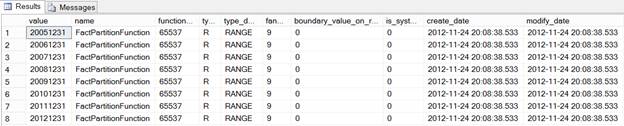
First of all, we need to create partition function to divide the data on a yearly basis starting from 2005 to 2012 as shown in the image below:
To create a partition function we use the CREATE PARTITION FUNCTION T-SQL command as shown below. If you notice, I have used LEFT range, which means the boundary value will go the left side of the partition. USE [AdventureWorksDW2012] GO CREATE PARTITION FUNCTION [FactPartitionFunction](int) AS RANGE LEFT GO Wherever applicable, I personally prefer using RIGHT range, especially with the DATE or DATATIME type of partitioning column as it is more manageable. For example, if we want to partition on a monthly basis we need to specify the last day of month with LEFT range (something like 20120131, 20120229, 20120331 and so on), which is a little difficult to manage but if we are using RIGHT range we need to specify the first day of the month (20120101, 20120201, 20120301 and so), which is more manageable. Next we need to create partition scheme. To create it we use the CREATE PARTITION SCHEME T-SQL command, specify the partition function and specify file groups to map each partition to each file group as shown below: CREATE PARTITION SCHEME [FactPartitionScheme] GO As I mentioned before, you can specify all the partitions of the table to go to a single file group or specify each partition to go to a different file group. Please note, I have the PRIMARY file group to map the partition for simplicity but in a real implementation it’s recommended to have partitions map to file groups other than PRIMARY. Normally, later partitions are frequently accessed and hence the file groups of these partitions should have the fastest drive possible, whereas the oldest partitions can be mapped to file groups with a slower disk as older partitions are not frequently accessed. Next we need to create a table and specify it to be created using a partition scheme using the ON clause, unlike the file group that we do for a non-partitioned table. We also need to specify a column from the table, which will be used as a partitioning column and whose data type should match with the data type of the partition function: CREATE TABLE [dbo].[FactResellerSalesWithPartition] As we have created the above table as a partitioned table, we can verify it using the below query, which will tell boundary values for data distribution: SELECT r.value, f.* FROM sys.partition_functions f GO
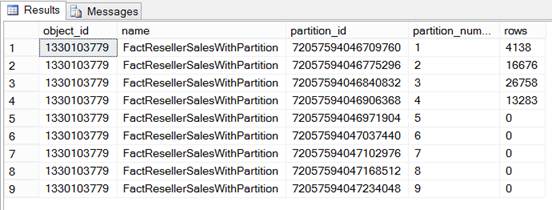
So far so good, we have created a partition function, a partition scheme and a partitioned table and we have also verified the table has partitions. Now let’s load some data into this partitioned table and see how data is distributed across different partitions (internally by SQL Server) based on the distribution rule specified with partition function: USE [AdventureWorksDW2012] Once you are done with loading data into the table, you can execute the below query to see how many records moved into or exists in each partition of the table. You can notice there are 4138 records from the year 2005 and hence residing in partition number 1 (which is for 2005 from the partition function definition), there are 16676 records from the year 2006 and hence residing in partition number 2 (which is for 2006 from the partition function definition) and so on. SELECT t.object_id, t.name, p.partition_id, p.partition_number, p.rows FROM sys.partitions AS p GO
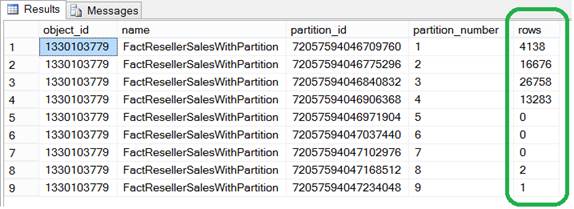
Now let’s insert some individual records and see how they are moved to appropriate partitions. As you can see below, I have three records, two of them are from the year 2012 and one of them is from the year 2013 as highlighted below: --2012 INSERT [dbo].[FactResellerSalesWithPartition] ([ProductKey], [OrderDateKey], [DueDateKey], [ResellerKey], [SalesOrderNumber], [SalesOrderLineNumber], [OrderQuantity], [UnitPrice], [SalesAmount]) INSERT [dbo].[FactResellerSalesWithPartition] ([ProductKey], [OrderDateKey], [DueDateKey], [ResellerKey], [SalesOrderNumber], [SalesOrderLineNumber], [OrderQuantity], [UnitPrice], [SalesAmount]) --2013 INSERT [dbo].[FactResellerSalesWithPartition] ([ProductKey], [OrderDateKey], [DueDateKey], [ResellerKey], [SalesOrderNumber], [SalesOrderLineNumber], [OrderQuantity], [UnitPrice], [SalesAmount]) Now let’s verify again the partition-wise record distribution using the script provided below. If you notice, out of those three records we inserted above, there are two records from the year 2012 residing in partition number eight (which is for 2012 from the partition function definition) and there is one record from the year 2013 residing in partition number nine (which is for 2013+ from the partition function definition). SELECT t.object_id, t.name, p.partition_id, p.partition_number, p.rows FROM sys.partitions AS p INNER JOIN sys.tables AS t ON p.object_id = t.object_id WHERE p.partition_id IS NOT NULL AND t.name = 'FactResellerSalesWithPartition' GO
Partitioned IndexAs discussed before, partitioned indexes can be created independently from their base table but it generally makes sense to create a partitioned table and then create an index on that table. Further, it’s recommended to have your indexes aligned to the table by use of same partition function (or similar partition function with same boundary definition). It’s also recommended to use the same partition scheme (or similar partition scheme with same partition to file group mapping) to make the indexes storage aligned. When indexes are partitioned and are aligned they serve as the local indexes for each partition, which makes sense during frequent partition switches. To partition an index, the ON clause is used, specifying the partition scheme along with the column when creating the index: CREATE CLUSTERED/NONCLUSTERED INDEX <IndexName> ON <TableName>(<ColumnNames>) ON <PartitionName>(<ColumnName>) Please note, when you create an index on a partitioned table using the basic CREATE command and don't provide the ON clause, the index gets created using the same partition scheme of the table by default. To learn more about creating partition index, click here. ConclusionIn this article of the series, I demonstrated a step-by-step guide on creating partition table/index using T-SQL commands; in the next article I am going to demonstrate a step-by-step guide on creating partition table/index using wizards in SQL Server Management Studio (SSMS).
|
手机版|小黑屋|BC Morning Website ( Best Deal Inc. 001 )
GMT-8, 2025-12-13 14:30 , Processed in 0.014841 second(s), 17 queries .
Supported by Best Deal Online X3.5
© 2001-2025 Discuz! Team.