设为首页收藏本站

 找回密码
 注册

QQ登录

只需一步,快速开始

查看: 747|回复: 0

SSH access via PuTTY. Public/private key pair authentication

[复制链接]
发表于 2011-11-7 23:25:09 | 显示全部楼层 |阅读模式
Lots of web hosting services offer SSH access. Most popular windows SSH client is PuTTY (http://www.chiark.greenend.org.uk/~sgtatham/putty/). If you however have many different web hosting providers, or more than one accounts, it becomes hard to remember so many usernames/passwords. Here we'll provide a way to login to all your accounts on all hosting providers using the same password (or no password) and in the same time not having to change all SSH passwords or saving them to your computer.
Public/private key authenticationThe method we use is SSH authentication with public/private key pair. You can find out more about public/private keys here. In our case we'll just generate such pair, keeping the private key to yourself. The public key will be put as a trusted key on all your SSH accounts. Then we'll setup PuTTY client to use private key for authentication for all web hosting services.
                               
               
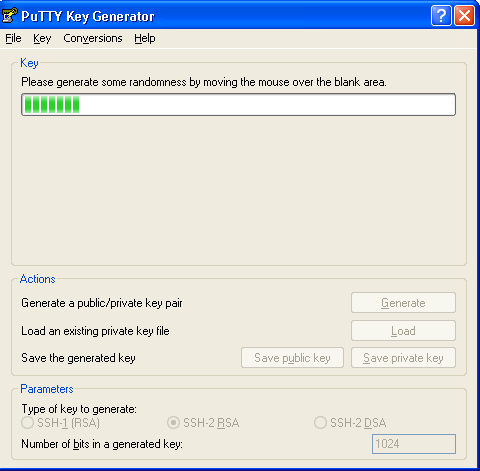
Generating key pairDownload and install PuTTYgen from http://www.chiark.greenend.org.uk/~sgtatham/putty/download.html if you don't have it yet. Set "Type of key to generate" to the SSH protocol your hosting service provides (usually you won't have to change it at all). Press "Generate" button and move the mouse to create unique key.


Now that the key is ready you should decide whether or not to use a passphrase. If you choose to have a passphrase, you'll be prompted for it every time you login. Skipping the passphrase however is less secure. Then use "Save public key" to save the public key to a file, for example bobi_key.pub. Save the private key to bobi_key.pkk.


Keep those two files somewhere and do NOT give your private key (*.pkk) to anyone.
Setting up SSHUse a text editor, ftp or something else to add the public key to authorized keys of each account. Tha file that contains them is ~/.ssh/authorized_keys. If you don't find directory .ssh or such file in it under your home directory just create them. Copy/paste the content of bobi_key.pub to ~/.ssh/authorized_keys (it should be one row like this
ssh-rsa AAAAB3NzaC1yc2EAAAABJQAAAIEAoGYNZIORXmHJaqhRWDzxGZaTUhxh8tlcBlm8bLIpKBb5fU6N6lwdzBi9qubRakzbgQUq9fCaO2J13pKVHhZbreJRPV+UcJnNHV7rsAxoI89hXeRVmjw75mLs/vq1T0XvDI8Gfyx/5J97nAlSJaW0k7K5qxoxlwG0ta94aRzrzVE= rsa-key-20071103.
Do this on the remaining accounts.

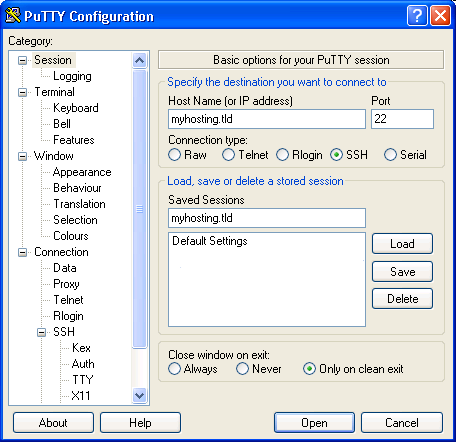
Setting up PuTTYFirst create a new session for this host, for example myhosting.tld.


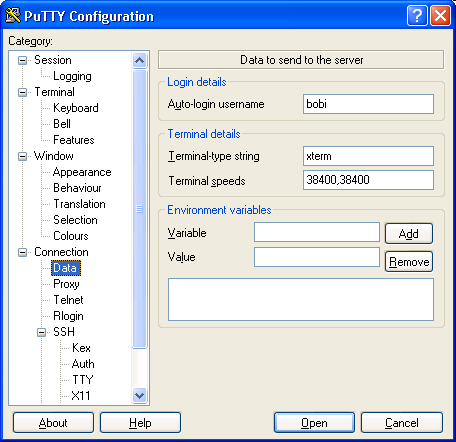
In Connection->Data set up Auto-login username to your username (let's say bobi).


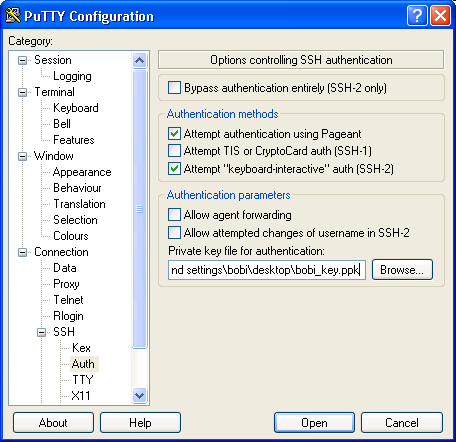
In Connection->SSH->Auth set Private key file for authentication to your .pkk file (bobi_key.pkk).


Save the new session and try it. If you have a passphrase you'll be prompted for it. If not - you should login just with a double click - no username and password are required.

http://www.ustrem.org/en/articles/ssh-public-private-key-authentication-with-putty-en/

发表于 2011-12-30 19:36:13
好东东,谢谢楼主


商标注册费用
支持 反对

您需要登录后才可以回帖 登录 | 注册

本版积分规则

手机版|小黑屋|BC Morning Website ( Best Deal Inc. 001 )  

GMT-8, 2026-2-5 02:44 , Processed in 0.014583 second(s), 16 queries .

Powered by Discuz! X3.5

© 2001-2026 Discuz! Team.

快速回复 返回顶部 返回列表