|
|
The Netgear WGR613VAL is one of the popular routers used by AOL when they were providing VoIP services. They were available through many stores when AOL discontinued the service and they can be unlocked in order to be used with other VoIP companies.
To unlock them, you will need a serial console cable with TTL level converter and the unlocked firmware.
Open the router's case and locate the serial console header. Note that no pins are installed, so you need to install your own in order to connect the console cable.
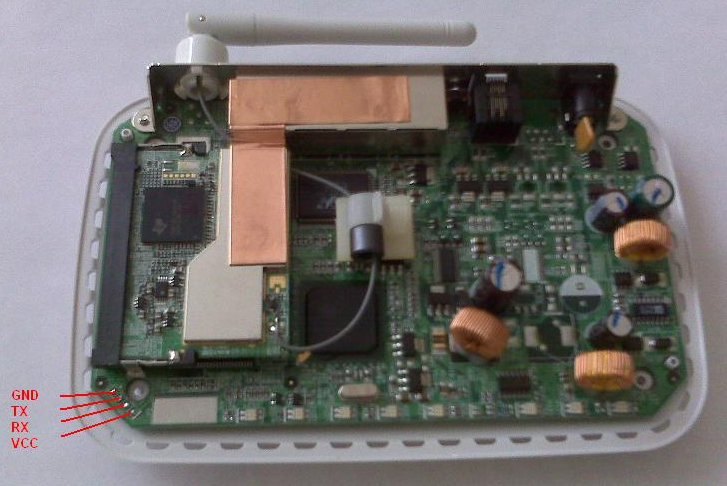
The pinout is indicated in the picture above. Once you got your serial cable hooked up use your favorite terminal software (Hyperterm, PuTTY) and connect to the console at 9600,n,8,1,Hardware Flow.
Power on the router and hit ESC to stop booting when you see the first messages coming up. You should get a prompt (psbl) which means you can enter commands. Type the command printenv and look for the RC4_KEY (see below for a sample output)
Minimal POST completed...
PSPBoot1.0 rev: 1.0.1
(c) Copyright 2002-2003 Texas Instruments, Inc. All Rights Reserved.
FAT integrality checking ...
Both FATs checksum pass
Verify & Check FFS OK!
Press ESC for monitor... 1
(psbl)$ printenv
MODETTY0 9600,n,8,1,hw
MODETTY1 9600,n,8,1,hw
CPUFREQ 125000000
SYSFREQ 125000000
MEMSZ 0x02000000
FLASHSZ 0x00400000
IPA 172.31.11.2
SUBNET_MASK 255.255.255.0
BLINE_ESWITCH esw(3,0)host:file e=172.31.11.155:ffffff00 f=0x40 g=172.31.11.249
BLINE_MAC0 cpmac(0,0)host:file e=172.31.11.155:ffffff00 f=0x40 g=172.31.11.249
BLINE_MAC1 cpmac(1,0)host:file e=172.31.11.155:ffffff00 f=0x40 g=172.31.11.249
DSP_IMAGE tg1_487.ld
VOP_CFG vop.cnf
genconfig nmmmainconf
atpmconfig nmmatpmconf
BOOTOS ggsip
IP_GATEWAY 172.31.11.249
IPA_GATEWAY 172.31.11.249
HOSTNAME TNETV1050SDB
BOOTCFG m:f:"ggsip"
TFTP_SVR_IP 172.31.11.100
BOOTHWID 050035985910
BOOTFLASHSDRAM 18
PROMPT psbl
$ 00:0f:b5:13:1c:4b
HWA_1 00:0f:b5:13:1c:4b
HWA_0 00:0f:b5:13:1c:4a
OEM_VSP_COUNTRY 000000
RC4_KEY bfa97c6b1b90872b2cda3c5c21a0e430ce5e5c4ee8a4766f8c67868319de16fa
The last 8 characters in the RC4_KEY are the password to upgrade your firmware.
Now, boot up your router, then login to its web interface at http://192.168.61.1 (as admin / password), then change the URL in your browser to http://192.168.61.1/upgrade.htm. The username is admin, the password is the last 8 characters in the RC4 key you found earlier.
Upload the file WGR613VNA_2342_101.bin and let the router reboot when it's done.
Finally, once the router has come up, login again to the web interface at 192.168.61.1, and reset all the voice settings under the 'Voice Back' menu.
Your router is now permanently unlocked and ready to use with another VoIP service
|
|


 窥视卡
窥视卡 雷达卡
雷达卡 发表于 2011-8-15 22:30:28
 提升卡
提升卡 置顶卡
置顶卡 沉默卡
沉默卡 喧嚣卡
喧嚣卡 变色卡
变色卡 抢沙发
抢沙发 千斤顶
千斤顶 显身卡
显身卡