找回密码
 注册

QQ登录

只需一步,快速开始

查看: 519|回复: 0

Change Two - Finger Scrolling on One - Finger Scrolling

[复制链接]
发表于 2013-4-9 12:26:08 | 显示全部楼层 |阅读模式
Go to:

Control Panel -> Mouse

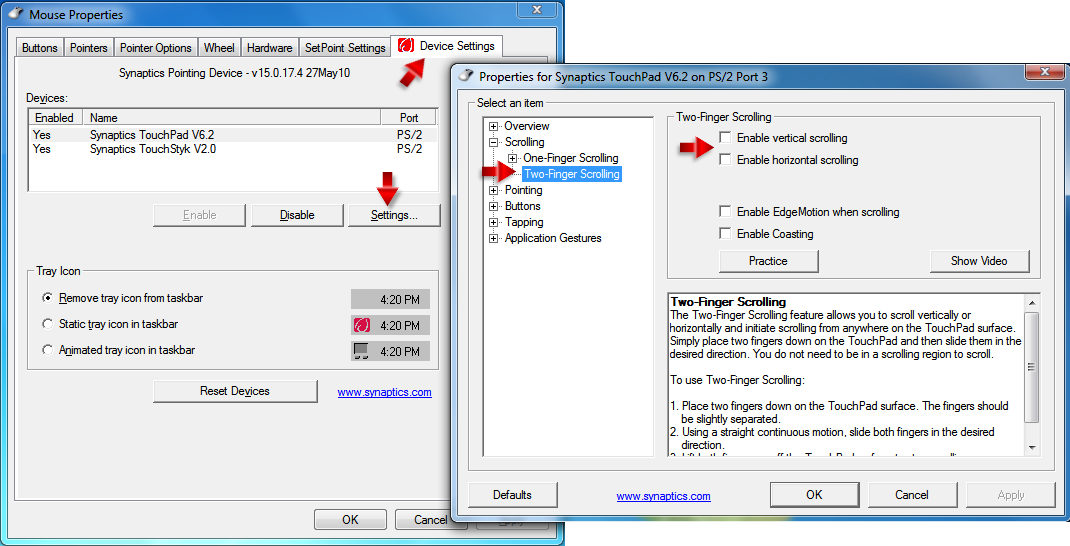
click the ' Device Settings ' tab. Choose ' Synaptics TouchPad ' and little lower click ' Settings... '.
From the list select the ' Scrolling ' category. For the option ' Two - Finger Scrolling ' uncheck:

  • Enable vertical scrolling
  • Enable horizontal scrolling.
Click ' OK' .


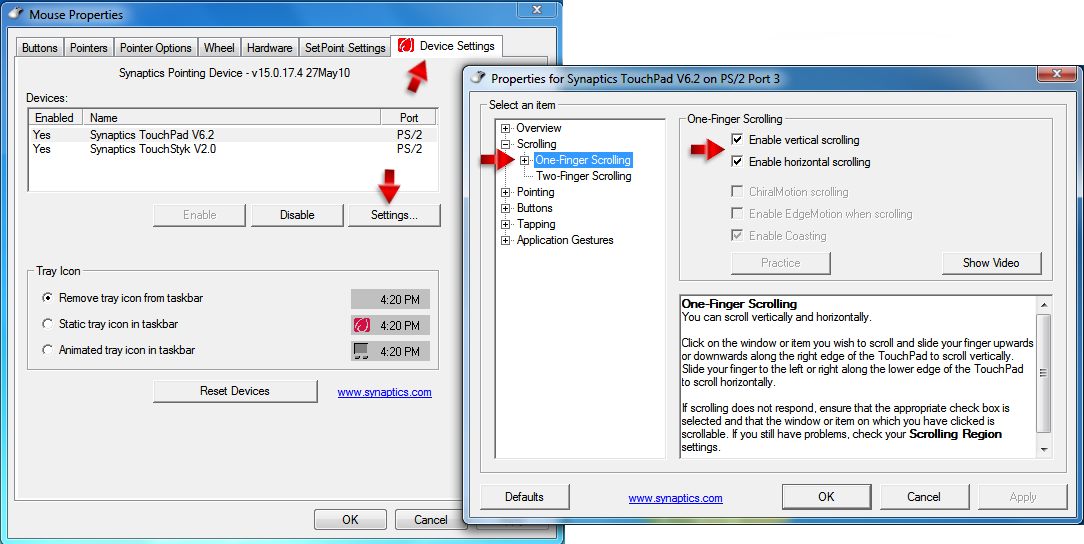
In the ' Scrolling ' category select this time ' One - Finger Scrolling ' and check:

  • Enable vertical scrolling
  • Enable horizontal scrolling.
Click ' OK' .


From: HP

您需要登录后才可以回帖 登录 | 注册

本版积分规则

手机版|小黑屋|BC Morning Website ( Best Deal Inc. 001 )

GMT-8, 2026-4-11 11:40 , Processed in 0.015519 second(s), 17 queries .

Supported by Weloment Group X3.5

© 2008-2026 Best Deal Online

快速回复 返回顶部 返回列表