|
|
The Motorola VT1005 is one of the popular ATAs used by Vonage in their first few years. The device was made almost exclusively for Vonage and few other VoIP companies use it. However the device can be unlocked for use with other providers.
There are two known methods for unlocking this ATA which will be presented here. The original one developed by me uses a JTAG cable. Another method using just the serial console has been developed by the DSLR user Charles Martel.
Please note that I can't take any responsibility if you completely trash your VT1005V. Also, you will never be able to use your VT1005 with Vonage again.
For both methods you will need to download this package which contains all the files required to unlock and configure the adapter.
JTAG unlock method
Open the ATA's case, and look at the bottom side of the PCB. There will be an area covered by an aluminum cover. You need to take the cover off to access the JTAG pins. This is what the back of the unit should look like once the cover is off:
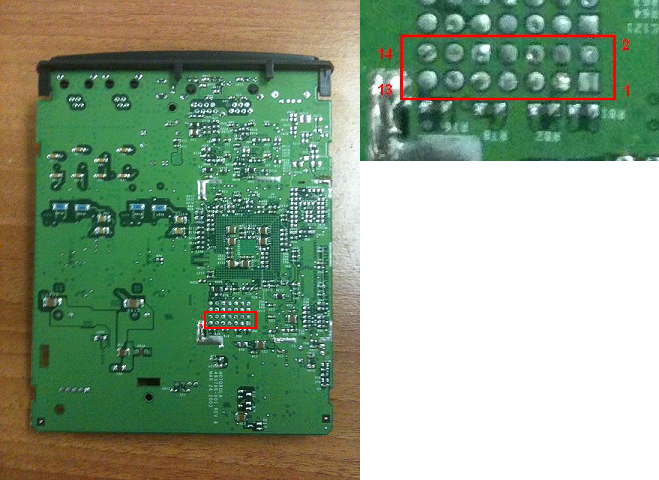
Connect your JTAG cable to the set of pins highlighted, but keep in mind that this is the bottom of the unit so everything is mirrored (I marked the pins in the picture, just in case).
The JTAG unlock folder included in the ZIP has the tools required for the unlocking process. I used the tjtag.exe which is an enhanced version of the jtag utility but other versions may work as well. You should copy the tjtag.exe to the unlock folder, or put it somewhere in the path so that it's accessible from the batch files. Also, you need to install the giveio.sys driver if you have not used it before. To do this, copy the file giveio.sys to c:\windows\system32\drivers, then run loaddrv.exe, point it to the file you just copied and click Install. Every time you want to use the HTAG software after a system reboot, either run loaddrv.exe, point it to the giveio.sys file and click Start, or open a command prompt and type net start giveio.
Then open a command prompt under the JTAG unlock folder and run backup.bat. This step it's really needed, but it's a good test to see if your JTAG cable works properly and it will make a backup of the area that will be modified.If everything looks OK, you're ready to run unlock.bat. This will save a portion of the flash, modify it and upload it back. After this, your device will be unlocked and you can pack it back.
Console unlock method
For this procedure you need a serial cable with TTL level converter, connected to the 4 pin header on the top side of the unit. The pinout, left to right is VCC GND TX RX. The serial port parameters are 38400 8N1, no flow control.
The unlocking program is found under the Console unlock folder, unlock.txt.
If you use Hyperterminal to access the serial console, go to the File menu -> Properties -> Settings -> ASCII Setup -> Line delay: set to 20 ms.
With the console connected, press ^X to reboot the router, then hit enter rapidly to tell the bootloader not to start the application. You should now be at the [VT1000 Boot] prompt. Then, use Transfer -> Send text file -> unlock.txt. If you use PuTTY, simply copy all the file content to the clipboard, then paste it in the console.
The type "g 94100000" (without quotes) to start the program. You should see something like this:
[VT1000 Boot]:Starting at 0x94100000... | / .---. VT1005 Unlocker '-. | | .-' Copyright (C) 2010 Charles Martel ___| |___ -= [ ] =- "Western Civilization grew up listening to us. `---. .---' It still does." __||__ | | __||__ '-..-' | | '-..-' || | | || ||_.-| |-,_|| .-"` `"`'` `"-. jgs .' '.WAN MAC address: 00:0c:e5:88:88:88LAN MAC address: 00:0c:e5:88:88:87 Serial number: 111111111111111100000000Press 'Y' to continue:If the MAC addresses, serial number, and ASCII graphics all look OK, press 'Y' to unlock your unit. After a few seconds, your ATA will be unlocked. Otherwise abort because something might have gotten corrupted.
Programming the device
After using any of the above methods, your adapter will be unlocked. Connect a computer to the PC port of your VT and login to 192.168.102.1. You will notice the new Service tab at the top. This is where you should put the IP address or host name of your TFTP server.
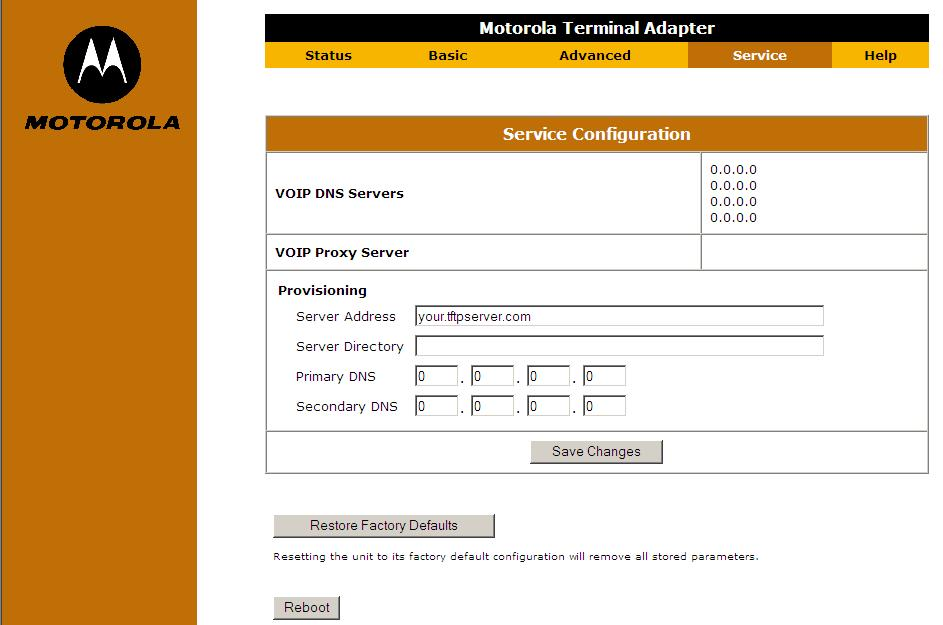
The adapter will look in the root of your TFTP server for a file called motvt1000_001122334455.bin where 001122334455 should be replaced by your VT1005's MAC address.
So here comes the second part, building that file. For this, you need the tools in the CFGBuilder folder that is included in the ZIP. There's a file called sample.txt which can be edited with Notepad, where you need to put all your settings. Then run the vt1005.bat to compile this into a BIN that will be accepted by the ATA. This is the file that you will upload to your TFTP server's root. |
|


 窥视卡
窥视卡 雷达卡
雷达卡 发表于 2011-8-15 22:29:45
 提升卡
提升卡 置顶卡
置顶卡 沉默卡
沉默卡 喧嚣卡
喧嚣卡 变色卡
变色卡 抢沙发
抢沙发 千斤顶
千斤顶 显身卡
显身卡