| Due
to the popularity of the Linksys/Cisco PAP2 and PAP2T adapters, there
has been an abundance of counterfeit ATAs lately, available mostly
through sites like eBay, Craigslist or Kijiji but also some online
merchants. While the counterfeit devices work identically to the genuine ones, experience has shown that they tend to fail much quicker than the genuine devices, most of the time within the first few months of use. The typical behaviour of a failed device is that it doesn't boot, doesn't respond to web access and phone commands and the power LED stays red (orange in the case of PAP2T). Most of these are coming from sellers in China / Hong Kong but some local sellers also import them in bulk and retail them locally. This short guide will show a few simple steps to check if your PAP2(T) is genuine. Start by examining the label on the back of the unit. Find the serial number and MAC address. The serial number and MAC address should be printed in barcode as well as readable characters. If only the barcode is printed, like the picture on the left, the ATA is a counterfeit. If the label has the MAC address and serial number both in barcode and readable characters, like the picture on the right, proceed to the next step. 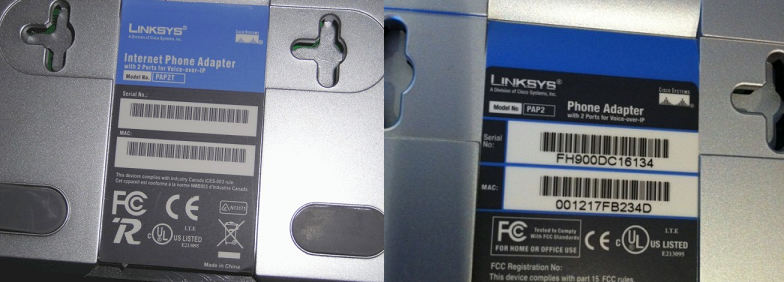 Take the first 6 digits of the MAC address (001217 in the example pictured), enter them in the next field and click Search. In the page that opens check the value for Vendor. It should say Cisco, Linksys or Sipura. If it shows a different company, the ATA is a counterfeit. |
手机版|小黑屋|BC Morning Website ( Best Deal Inc. 001 )
GMT-8, 2026-10-10 07:28 , Processed in 0.007529 second(s), 19 queries .
Supported by BestDeal Online X5.0
© 2001-2026 Discuz! Team.



